
Agentic code workflows with Nick Tune

With the rise of AI coding workflows, many engineers have started to find their own ways to do it properly. Some use just plain LLMs via the web; others use GitHub Copilot or Claude Code. But inside, the key thing that improves the quality of the whole process is the workflow followed, together with the tools used. In this article, we will present best practices for advanced agentic code workflows with Nick Tune.
Nick is a senior staff software engineer at PayFit and the author of Architecture Modernization (Manning). His focus areas are legacy migration, domain-driven design, and continuous delivery.
Nick will walk us through exactly how he works: how he plans features, how he structures AI workflows as state machines, how he enforces architecture rules deterministically, and how he keeps AI-generated code from quietly degrading quality over time.
In particular, we are going to talk about:
How Nick approaches AI tools. Try it on everything, timebox the experiments, and track what actually pays off.
Agentic coding workflow. Nick models his development process as a state machine with typed transitions and enforced invariants. The workflow itself has unit tests.
Planning and PRDs. How he structures requirements before any code is written, and why he spends real time here before touching Claude Code.
Implementing features autonomously. Claude runs the full cycle from requirements to pull request, with guardrails that block non-compliant code from landing.
Code quality and architecture rules. Lint rules, dependency constraints, and why deterministic checks beat asking Claude to follow conventions.
Code reviews. Here Nick talks about his layered approach to code reviews: CodeRabbit, local review agents, and his own eyes on every PR before anything ships.
Testing with TDD. How he runs Claude through a strict red-green cycle with verified pre- and post-conditions at every step.
Tooling and techniques. His custom CLI setup and a few smaller tricks are worth stealing.
So, let’s dive in.
Unblocked: Context that saves you time and tokens (Sponsored)
Stop babysitting your coding agents. Unblocked gives them the organizational knowledge to generate mergeable code without the back-and-forth. It pulls context from across your engineering stack, resolves conflicts, and cuts the rework cycle by delivering only what agents need for the task at hand.

1. Who is Nick?
Hi, I’m Nick. I’m a Senior Staff Software Engineer at PayFit, a European payroll and HR company. I’m the author of a book called Architecture Modernization (Manning). Legacy modernization, along with software architecture, domain-driven design, and continuous delivery, are my main areas of focus. I’m based in London, UK.
2. How do you use AI tools in general?
The current strategy is to use it everywhere. Figure out what works and what doesn’t. That’s basically my current philosophy. Every time I do anything, I try to use AI to help me. Sometimes I don’t have time, and I just need to get stuff done, though, and I can’t afford to experiment, e.g., 3 hours trying to get AI to create perfect diagrams vs just doing it myself. But I make an effort to at least timebox it with AI.
For example, I was recently working on resolving customer support tickets, and I thought, “Wouldn’t it be great if I had a tool that allowed me to keep track of all this and act as a memory for my AI agents so they could work on 10 customer support tickets in parallel?” My initial thought was “it’s the peak season, I can’t really afford to let a backlog of tickets build up while I’m playing around with AI," but then I said to myself, “well just spend 1 hour on it and see what happens?”
The break-even point came within 2-2.5 days. I had built a custom tool (UI, investigation subagents, etc.) and resolved the number of tickets I would have done manually. By the end of the week, I felt 20 - 40% more productive than I would have been without it. In fact, it was funny because at the end of the week, I was working on a ticket when another ticket was raised. While I was working on the first ticket, I had Claude using the process I’d built to work on the new ticket. Then there was an issue where some highlighted that the 2nd ticket was causing issues for some clients and needed to be prioritised.
At that point, I checked in on Claude, and he’d already figured out the root cause and the exact code causing the problem. And this wasn’t a simple bug; it spanned 3 codebases and required correlating data from 3 different data sources to identify where the inconsistency was introduced.
What I built in a week was still quite basic. But like I said: the ROI was achieved within 3 days, AND I now have a version that I can keep iterating and improving (both the underlying AI system and the UI for managing it all), so the potential long-term ROI and learning insights I can apply to other initiatives is significant. And all because I pushed myself to “come on, let’s do that 1-hour timebox. ”
But it doesn’t always work out; sometimes it ends in wasted time and frustration. That’s why it’s important to understand that getting the best results usually requires an investment.
3. What is your main agentic workflow for coding?
It depends on the repository. You can see an example from one of my open-source projects here: https://github.com/NTCoding/living-architecture.
I try to have a very strict, repeatable workflow so that AI can autonomously implement features, and I know that all steps, checks, rules, and reviews will be completed without exception.
I’m currently working towards a more hook- and event-driven workflow. This is a major differentiator because you can apply fine-grained rules deterministically based on your workflow's current state.
Basically, you model your workflow as a state machine (like an aggregate in DDD). The workflow has rules and invariants, and stores its internal state in persistence. This can be written in full code with 100% test coverage. Every time AI does something wrong, you write a failing test and implement - for example, not allowed to commit code during the “planning” phase.
This is an example of the PR-creation state machine step:
export const submittingPrState: ConcreteStateDefinition = {
  emoji: '🚀',
  agentInstructions: 'states/submitting-pr.md',
  canTransitionTo: ['AWAITING_CI', 'BLOCKED'],
  allowedWorkflowOperations: ['record-pr'],
  forbidden: { write: true },

  allowForbidden: { bash: ['git push', 'gh pr'] },

  transitionGuard: (ctx) => {
    if (!ctx.state.prNumber) return fail('prNumber not set. Run record-pr first.')
    return pass()
  },
}
In this state:
🚀SUBMITTING will be prefixed to each agent message so I can always see the current state
The instructions in `states/submitting-pr-md` will be injected into the current conversation when the agent transitions to this state (and it will also be re-injected if the agent makes an error and needs reminding)
The agent can transition to `AWAITING` or `BLOCKED` from this state. If it tries to transition to another state, it will be blocked (and the prompt in `states/submitting-pr.md` will be re-injected into the error message)
The agent can invoke the worfkflow operation `record-pr` which will update the state of the workflow, it cannot call other workflow methos
The agent cannot write any files
The agent is allowed to use `git push` and `gh pr` => even though these are globally forbidden
When the agent tries to transition to a new state, the transition will fail if `ctx.state.prNumber` has not been set => that is a requirement of this phase, to create the PR and record the PR number. The agent’s job here is not done until that obligation is fulfilled (the following workflow steps depend on it, the whole workflow is broken without it)
Remember that this is all real code, so you can fully unit test it.
4. How do you plan first?
How I plan depends on the type of project, e.g., building an open-source project vs. a complex legacy migration.
For my open source projects, I have a PRD expert agent (a product requirements expert). This agent helps me to discuss a project, define the requirements, shape the architecture, and produce a structured PRD file that lists dependencies.
A structure of PRD is as follows:
# PRD: [Feature Name]
**Status:** Draft | Planning | Awaiting Architecture Review | Approved

## 1. Problem
[What problem, who has it, why it matters]

## 2. Design Principles
[What we're optimizing for, trade-offs, WHY]

## 3. What We're Building
[Requirements with detail]

## 4. What We're NOT Building
[Explicit scope boundaries]

## 5. Success Criteria
[How we know it worked]

## 6. Open Questions
[Uncertainties to resolve - Draft only]

## 7. Milestones
[Major checkpoints - Planning only]

### M1: [Name]
[What's delivered at this checkpoint]

#### Deliverables
- **D1.1:** [Deliverable name]
  - Key scenarios (happy path + known edge cases)
  - Acceptance criteria
  - Verification
- **D1.2:** [Architecture deliverable, if this milestone introduces changes]
  - What doc to update and why
  - Verification

### M2: [Name]
...

## 8. Parallelization
[Work streams that can proceed in parallel]

## 9. Architecture
[Added during architecture review]

```yaml
tracks:
  - id: A
    name: [Track name]
    deliverables:
      - M1
      - D2.1
  - id: B
    name: [Track name]
    deliverables:
      - D1.2
      - M3
Once that is done, I have a command to create tasks, which creates tasks in GitHub (as GitHub issues). The reason I like to use GitHub is that when you create a pull request, it links to the issue, so code reviewers (human and AI) can review the PR against the full source of truth.
I usually spend quite a lot of time discussing PRDs, and my PRD expert is set up as a coach who asks good questions and challenges me. It’s not just a robotic step-by-step process.
For legacy migration projects, I have a team of agents who scan codebases, map the current state, identify migration options, and produce draft ADRs for me to review. Things like “identify all the API endpoints in the codebase, and do a full end-to-end analysis (use a separate subagent for each API endpoint to optimize context window usage” and “compare the API endpoint in the legacy with existing API endpoints in the target system, which is the best fit, or should we create a new endpoint?” I actually provide these agents with very structured and precise instructions and analysis criteria. I try to put my exact thought process on paper rather than giving AI too much freedom.
5. How do you implement the initial code structure?
My default approach is an autonomous dev workflow. I kick off Claude, and it will implement the whole feature. The goal is to create a pull request that passes all checks and has been reviewed by code review agents and CodeRabbit (see below for more information).
The following shows an extract from a `docs/workflow.md` file. This is written primarily for the agent. It describes the states and what command to use in each state. As you can see, I have a mix of slash commands and real code (I strive for determinism where possible).
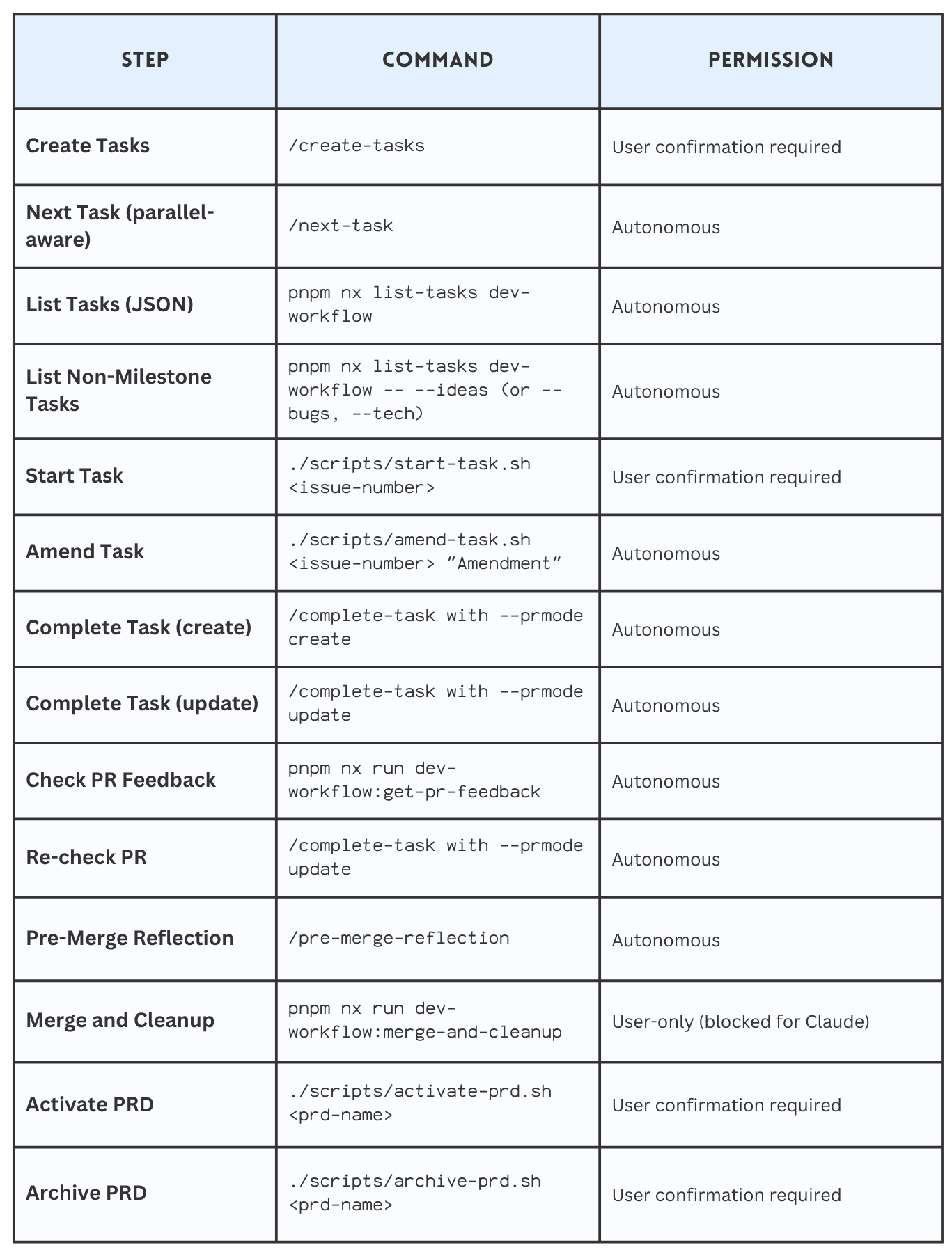
Claude then follows my TDD workflow to implement requirements. I have various checks in place, like pre-commit hooks, that ensure Claude cannot commit code that does not compile or lint. I have also banned operations like `git commit “–no-verify”` so Claude cannot work around the guard rails I have put in place.
Wherever possible, I try to leverage full code. E.g., I have a script that creates a GitHub PR, waits for all checks to pass, and fetches the PR feedback. Anything written in an agent’s prompt or a markdown file is too unreliable, and I have lost so much time pleading with agents to follow processes. As I mentioned in step 3, I’ve also been working towards a more deterministic workflow, which reduces reliance on the agent reading this file and doing the right thing (this file is still useful).
With real code, you get determinism and unit tests to verify it works the exact same way every time:
describe('executeCompleteTask', () => {

 it('passes workflow steps in correct order', () => {
    executeCompleteTask()

    const steps: unknown[] = mockRunWorkflow.mock.calls[0][0]
    const stepNames = steps.map((s) => {
      const step = s && typeof s === 'object' && 'name' in s ? s : null
      return step?.name
    })
    expect(stepNames).toStrictEqual([
      'verify-build',
      'code-review',
      'submit-pr',
      'fetch-pr-feedback',
    ])
  })

…
}
7. How do you improve code quality and correctness of AI-generated code?
Continuous improvement is the key. Every time your agent produces bad code, you need some way of updating your harness to ensure that it does not produce similar code in the future. The best way to do this is to use deterministic tools.
I have a lot of lint rules: file size rules, function complexity rules, naming rules, code comment rules, banned syntax (I don’t let Claude use “as” or “let” in TypeScript. I force it to write type-safe and immutable code.
In addition, I use a dependency cruiser to enforce architecture rules, such as that files in the “domain” folder cannot depend on files in the “infra” folder. I have a DDD/CQRS architecture that I use, and it is defined here: https://github.com/NTCoding/claude-skillz/tree/main/separation-of-concerns
So the documentation defines this structure:
features/              platform/              shell/
├── checkout/          ├── domain/            └── cli.ts
│   ├── entrypoint/    │   └── tax-calc/
│   ├── commands/      └── infra/
│   ├── queries/           ├── external-clients/
│   ├── domain/            ├── http/
│   └── infra/             ├── cli/
│       ├── mappers/       ├── persistence/
│       └── persistence/   ├── config/
│                          └── logging/
└── refunds/
    ├── entrypoint/
    ├── commands/
    ├── queries/
    └── domain/
Defines rules for enforcing the structure (rules are used during planning, development, and review).
SoC-006: Entrypoints are thin translation layers
Entrypoints translate between the external world and commands/queries: parse external input → invoke command/query → map result to external response. Nothing else.
Entrypoints own: input parsing, output formatting, interactive prompts (progress bars, spinners), and exit code mapping. When entrypoint/ grows large, extract infrastructure helpers to features/{name}/infra/.
And provide dependency-cruiser rules to enforce the convention that, even if Claude makes a mistake, the pre-commit hooks and PR checks will fail if there is a dependency violation.
Here is a rule that says a feature (aka a vertical slice) cannot depend on another vertical slice:
// --- Feature isolation rules ---
// Features are independent vertical slices. No feature may import from another.
// The $1 capture group ensures imports within the same feature are allowed.
{
  name: "no-cross-feature-imports",
  severity: "error",
  comment: "Features must not import from other features",
  from: { path: "features/([^/]+)/.+" },
  to: {
      path: "features/([^/]+)/.+",
      pathNot: "features/$1/.+"
  }
},
I find that Claude Code really struggles to make simple decisions about where to put code, so having strict rules and clear guidelines is key.
8. How do you do code reviews?
Depends on the project and team conventions. One thing that I use everywhere is CodeRabbit. It is quite amazing. I have it set up on all my pull requests, both personal projects and at work.
The great thing about CodeRabbit is that not only can it identify bad and insecure code, but it can also be configured to read all your coding standards and ADRs and find violations. It also stores learnings, and you can even tell it “next time remember to review <this>” or “don’t suggest <that>”.
Sometimes I also run CodeRabbit via CLI before creating a branch.
Read more here on how to use CodeRabbit for code reviews:

In addition, I have dedicated code review agents that run locally: code review, architect review, test review, QA check (does the work actually implement the required functionality), and bug check.
I have a strictly enforced workflow on some projects that prevents a pull request from being created until these reviews have run. The basic idea is to create a hook that blocks Claude from running the command directly and forces Claude to use a script that enforces the correct usage of the tool:
Hook wiring to block `git push`:
{
    pattern: /\bgit\s+push\b/,
    reason:
      ‘Blocked: Direct git push bypasses required workflow. Use /complete-task command instead, which runs the complete verification pipeline (lint, test, code review, PR submission) and prevents orphaned changes.’,
},
Then a script which enforces local code review before submitting a PR:
runWorkflow<CompleteTaskContext>(
   [verifyBuild, codeReview, submitPR, fetchPRFeedback],
   buildCompleteTaskContext,
   (result: WorkflowResult, ctx: CompleteTaskContext) => formatCompleteTaskResult(result, ctx),
)
One of the things I found with agentic code reviews is to be precise. Rather than saying “review the code for these <principles>”. I say, “For each modified file, review the file against each code review principle (I give them codes like CR-001 and write an audit table.” It forces the agent to get into the details rather than letting the agent decide to optimise for speed or efficiency when you actually want correctness and robustness.
I also review the code myself. I don’t feel safe deploying anything to production that I haven’t reviewed myself. The main thing for me is: giving feedback on a PR is a process failure. The AI didn’t do it right the first time, so I try to ensure the feedback I provide is built into the harness and automatically applied in the future.
9. How do you create tests?
I’ve used TDD throughout my career, and I push my agents to use something that resembles it. The focus is on writing tests first, obviously, and implementing them with the simplest possible solution, with structured pre-conditions for state transitions.
Example state definition:
<state name="RED">
  <prefix>🔴 TDD: RED</prefix>
  <purpose>Test IS failing for the right reason. Implement ONLY what the error message demands.</purpose>

  🚨 CRITICAL: You are in RED state - test IS CURRENTLY FAILING. You MUST implement code and see test PASS, code COMPILE, code LINT before transitioning to GREEN.
  DO NOT transition to GREEN until you have:
  1. Implemented ONLY what the error message demands
  2. Executed the test with Bash tool
  3. Seen the SUCCESS output (green bar)
  4. Executed compile check and seen SUCCESS
  5. Executed lint check and seen PASS
  6. Shown all success outputs to the user

  <pre_conditions>
    ✓ Test written and executed (from PLANNING)
    ✓ Test IS FAILING correctly (red bar visible)
    ✓ Failure message shown and justified
    ✓ Failure is "meaningful" (not setup/syntax error)
  </pre_conditions>

  <actions>
    1. Read the error message - what does it literally ask for?
    2. 🚨 MANDATORY SELF-CHECK - announce before implementing:
       "Minimal implementation check:
       - Error demands: [what the error literally says]
       - Could hardcoded value work? [yes/no]
       - If yes: [what hardcoded value]
       - If no: [why real logic is required]"

       Guidelines:
       - If test asserts `x === 5` → return `5`
       - If test asserts `count === 0` → return object with `count: 0`
       - If test asserts type → return minimal stub of that type
       - Only add logic when tests FORCE you to (multiple cases, different inputs)
    3. Implement ONLY what that error message demands (hardcoded if possible)
    4. Do NOT anticipate future errors - address THIS error only
    5. Run test (use Bash tool to execute test command)
    6. VERIFY test PASSES (green bar)
    7. Show exact success message to user (copy/paste verbatim output)
    8. Run quick compilation check (e.g., tsc --noEmit, or project-specific compile command)
    9. Run lint on changed code
    10. If compile/lint fails: Fix issues and return to step 5 (re-run test)
    11. Show compile/lint success output to user
    12. Justify why implementation is minimum
    13. ONLY AFTER completing steps 5-12: Announce post-condition validation
    14. ONLY AFTER validation passes: Transition to GREEN

    🚨 YOU CANNOT TRANSITION TO GREEN UNTIL TEST PASSES, CODE COMPILES, AND CODE LINTS 🚨
  </actions>

  <post_conditions>
    ✓ Implemented ONLY what error message demanded
    ✓ Test executed
    ✓ Test PASSES (green bar - not red)
    ✓ Success message shown to user verbatim
    ✓ Code compiles (no compilation errors)
    ✓ Code lints (no linting errors)
    ✓ Compile/lint output shown to user
    ✓ Implementation addresses ONLY what error message demanded (justified)
  </post_conditions>

  <validation_before_transition>
    🚨 BEFORE transitioning to GREEN, verify ALL with evidence from tool history:
    ✓ Test PASSES (green bar) - show verbatim output
    ✓ Code compiles - show output
    ✓ Code lints - show output
    ✓ Implementation addresses ONLY what error demanded - justify

    If ANY evidence missing: "⚠️ CANNOT TRANSITION - Missing: [what]" → stay in RED.
  </validation_before_transition>

  <critical_rules>
    🚨 NEVER transition to GREEN without test PASS + compile SUCCESS + lint PASS
    🚨 IMPLEMENT ONLY WHAT THE ERROR MESSAGE DEMANDS - no anticipating future errors
    🚨 DON'T CHANGE TEST TO MATCH IMPLEMENTATION - fix the code, not the test
  </critical_rules>

  <transitions>
    - RED → GREEN (when test PASSES, code COMPILES, code LINTS - green milestone achieved)
    - RED → BLOCKED (when cannot make test pass or resolve compile/lint errors)
    - RED → PLANNING (when test failure reveals requirement was misunderstood)
  </transitions>
</state>
Currently, I rely solely on prompts to enforce the TDD workflow. I don't use deterministic workflows for this, but in the future I’m tempted.
I have very strict lint rules on the tests, like:
100% test coverage mandatory (build will fail without it)
maximum assertions per test: 4
no conditional assertions
file size limit: 400 (forces AI to break up tests into descriptive chunks, and use patterns like it for each)
I also have a code-review agent focused on testing.
10. What are some useful techniques you use?
I have my own CLI tool for starting Claude code.
It runs `claude –system-prompt` to start the session. And it builds a system prompt based on specific personas I have. For example, I run `cl prd opus`. This will start a Claude code session using my PRD expert system prompt.
The benefits of this:
Embedding in the system prompt increases compliance
Dedicated system prompt means avoiding loading unnecessary content - when my PRD system prompt is loaded, I don’t need to load all my rules about unit tests, for example
Embedding in the system prompt is more efficient than reading files after the session has started
11. Anything else worth mentioning?
Build your own tools. One of the great things about AI is that it’s so easy to build simple tools. I built a whole project management tool to help me plan and deliver legacy modernization projects. I can build whole features in one Claude Code terminal while I’m waiting for Claude to finish some work in another terminal - it’s basically free.
My advice is to think about the task you are working on and ask yourself: What kind of CLI command, UI, or knowledge management tool would help me be more productive? How can I automate some of the annoying bits so I only need to focus on the important parts?
Then ask your AI agent to help you design a tool.
More ways I can help you
📱 You Can Build A LinkedIn Audience 🆕. The system I used to grow from 0 to 270K+ followers in under two years, plus a 50K-subscriber newsletter. You’ll transform your profile into a page that converts, write posts that get saved and shared, and turn LinkedIn into a steady source of job offers, clients, and speaking invites. Includes 6-module video course (~2 hours), LinkedIn Content OS with 50 post ideas, swipe files, and a 30-page guide. Join 300+ people.
📚 The Ultimate .NET Bundle. 500+ pages distilled from 30 real projects show you how to own modern C#, ASP.NET Core, patterns, and the whole .NET ecosystem. You also get 200+ interview Q&As, a C# cheat sheet, and bonus guides on middleware and best practices to improve your career and land new .NET roles. Join 1,000+ engineers.
📦 Premium resume package. Built from over 300 interviews, this system enables you to quickly and efficiently craft a clear, job-ready resume. You get ATS-friendly templates (summary, project-based, and more), a cover letter, AI prompts, and bonus guides on writing resumes and prepping LinkedIn. Join 500+ people.
📄 Resume reality check. Get a CTO-level teardown of your CV and LinkedIn profile. I flag what stands out, fix what drags, and show you how hiring managers judge you in 30 seconds. Join 100+ people.
✨ Join My Patreon community and my shop. Unlock every book, template, and future drop, plus early access, behind-the-scenes notes, and priority requests. Your support enables me to continue writing in-depth articles at no cost. Join 2,000+ insiders.
🤝 1:1 Coaching. Book a focused session to crush your biggest engineering or leadership roadblock. I’ll map next steps, share battle-tested playbooks, and hold you accountable. Join 100+ coachees.
Want to advertise in Tech World With Milan? 📰
If your company is interested in reaching founders, executives, and decision-makers, you may want to consider advertising with us.
Love Tech World With Milan Newsletter? Tell your friends and get rewards.
Share it with your friends by using the button below to get benefits (my books and resources).
Great article and love the framework that was presented. I found several of these organically .. including the use of PRD/ARD docs for formal context gathering.
And coupled with a UI session to create ADRs, review sprint demos and explain integration or benchmark results .. is an invaluable part of the process that enriches the development process and result. Quality all the way down.